
If you’ve ever landed on a website and thought, “This feels confusing and clunky,” you’ve just met the downside of poor design.
Good website design isn’t just what looks pretty. It’s what helps people feel comfortable, find what they need fast and take action without frustration.
In 2026, the bar for “good” is higher than ever.
People expect faster loading, smarter personalization, seamless mobile experiences and intuitive journeys that feel effortless.
Researchers and designers increasingly call this human-centered design because it matches how people think, explore and decide online.
This guide gives you design principles that truly matter today, examples you can visualize and clear ways to implement them so your site performs like a professional created it.
- What Makes a Good Website?
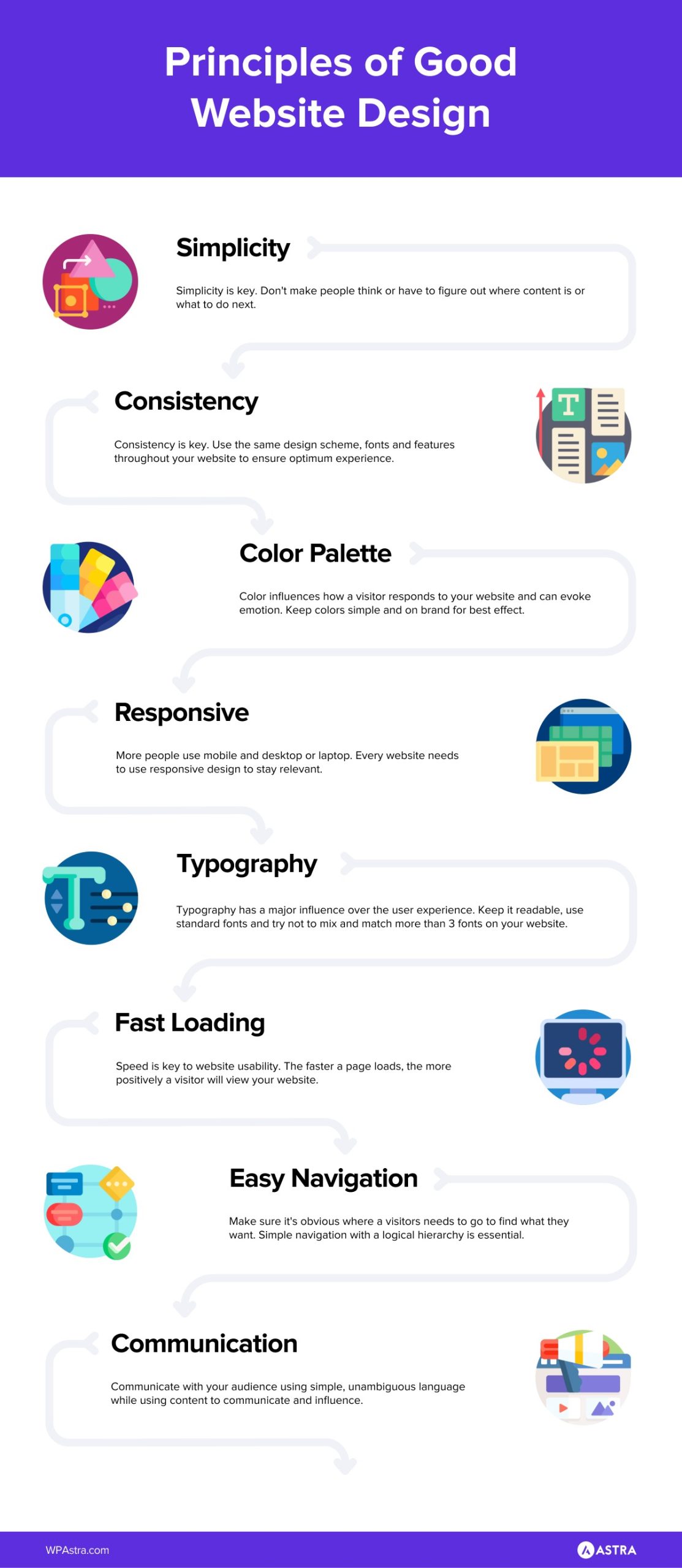
- 1. Simplicity With Purpose
- 2. Consistency Builds Confidence
- 3. Typography and Readability That Guides the Eye
- 4. Responsive and Mobile-First Experiences
- 5. Speed Is a Competitive Advantage
- 6. Navigation Should Feel Like a Conversation
- 7. Communication Through Design
- 2026 Trends To Watch
- Where To Find Inspiration and Examples
- Conclusion
What Makes a Good Website?
A great website doesn’t make people think about how to navigate it. It helps them focus on what they came for.
People visit your site with an intent. They want to learn, click, buy, join, download, or contact you.
If your design makes that straightforward, visitors stay. If it doesn’t, they leave.
Good design merges two things.
- An emotional experience that feels right
- A practical path that feels easy
For example, a homepage that loads quickly and confidently explains your value within seconds creates trust.
A site that changes layout and tone subtly depending on the user’s preferences or time of day feels created for them.
That’s the leap from nice design to effective digital experience.
If you’re planning to upgrade your website, don’t forget to A/B test with Sigmize to ensure you’re delivering the best experience possible.
1. Simplicity With Purpose
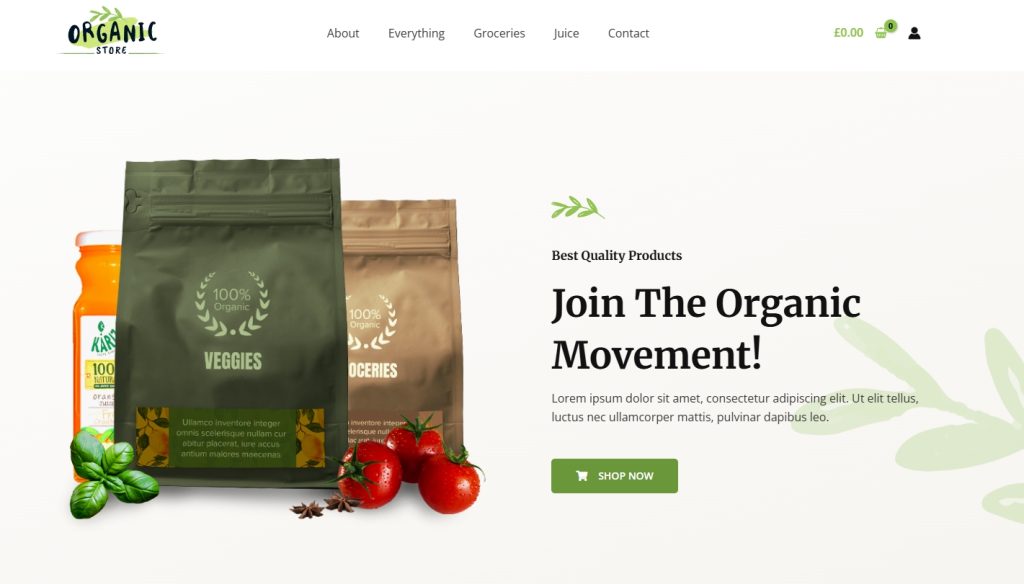
Simplicity in web design doesn’t mean making a website look plain or empty.
It means making it easy for visitors to understand what’s happening.
When someone lands on a page, they should quickly know where they are and what they can do next.
If they have to stop and think, or hunt around for meaning, the design is already getting in the way.
Clarity comes from removing distractions and giving every part of the page a clear job.
Headlines explain the purpose, buttons show the next step and unnecessary elements are removed so nothing competes for attention.
Websites that feel easy to use almost always follow this approach.
They guide visitors forward with clear messages, simple choices and calm layouts, so people can act with confidence instead of hesitation.
How To Create a Clear, Focused Layout Using Astra
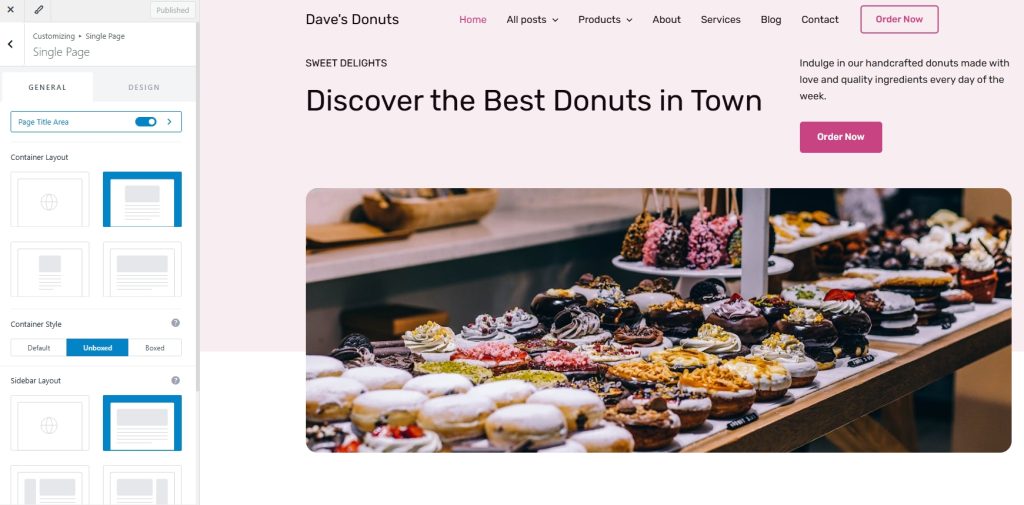
Astra is built to stay out of the way, which makes it ideal for simplifying pages.
To keep layouts purposeful:
- Go to Appearance → Customize → Post Types
- Choose a single layout for your posts and pages
- Disable unnecessary elements such as secondary sidebars or extra widgets
- Use Astra’s page level settings to remove headers or titles where they distract from the main message
For example, if you’re creating a landing page, disable the header and footer so the visitor focuses on one message and one action.
The Astra Style Guide makes it easier than ever to create a coherent look.
2. Consistency Builds Confidence

Consistency helps users build a mental map of your site so they don’t constantly have to figure out where things are.
It’s visual cohesion across pages and functional cohesion in how interactions behave.
Examples of consistency:
- Uniform buttons and colors across pages
- Consistent menu placement from homepage to checkout
- Matching tone and language in site copy and headings
If your site feels like a patchwork of different styles and layouts, people feel uncertainty.
Consistency creates reliability.
The copy paste styles feature in Spectra can help you build fast and consistently with minimal effort.
How To Set Global Colors and Fonts in Astra
Consistency is very easy to achieve with global settings.
In Astra:
- Go to Appearance → Customize → Global → Colors
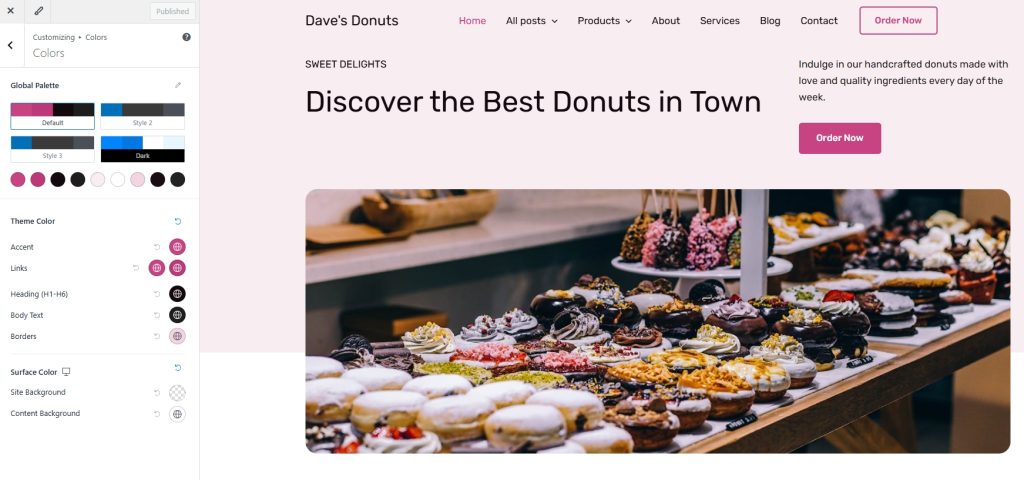
- Set your primary, secondary and accent colors
- Then head to Global → Typography
- Choose fonts for headings, body text and buttons
Once set, these styles apply automatically across your site. That means every page, blog post and button looks intentional.
The Astra Style Guide works amazingly well here too.
3. Typography and Readability That Guides the Eye
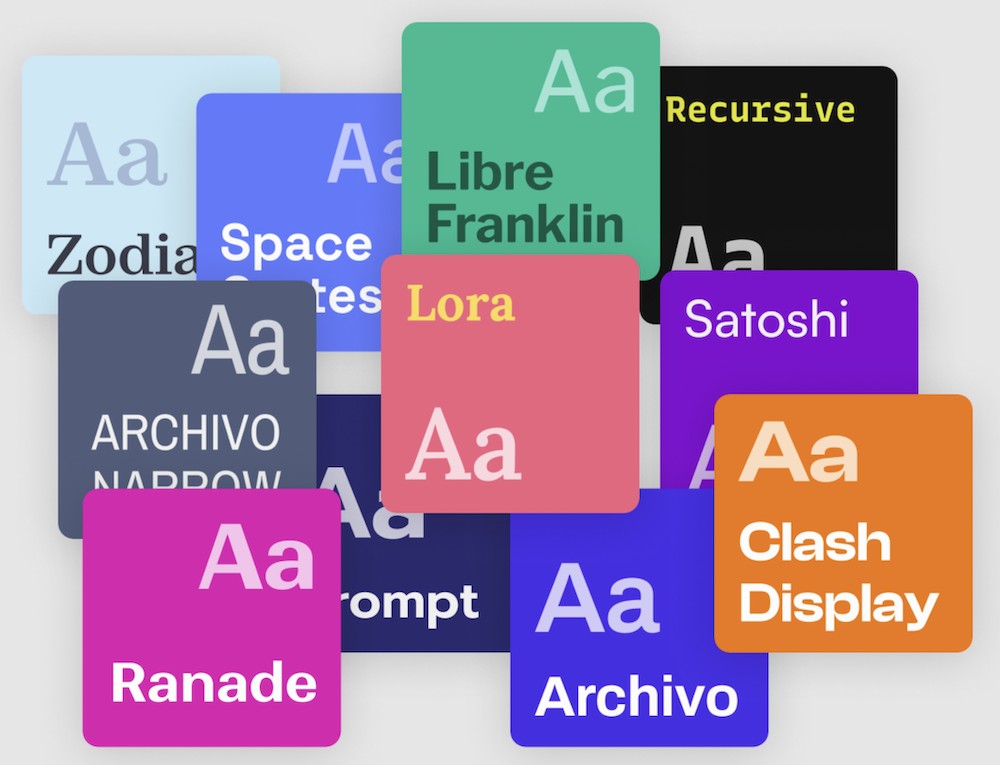
(Source: Fontpair)
Typography isn’t just about picking pretty fonts. It’s about hierarchy and comfort.
Users should know what’s a headline, a subheading and a body sentence instantly.
Examples that work:
- Strong contrast between text and background
- Larger font sizes for key messages (especially on mobile)
- Clear spacing between headings, paragraphs and call to action buttons
Even choices like line height and weight influence reading comfort.
When typography helps people scan before they read, your message lands faster.
How To Improve Text Hierarchy With Astra
Good typography is mostly about spacing and scale.
To improve readability:
- Go to Customize → Global → Typography
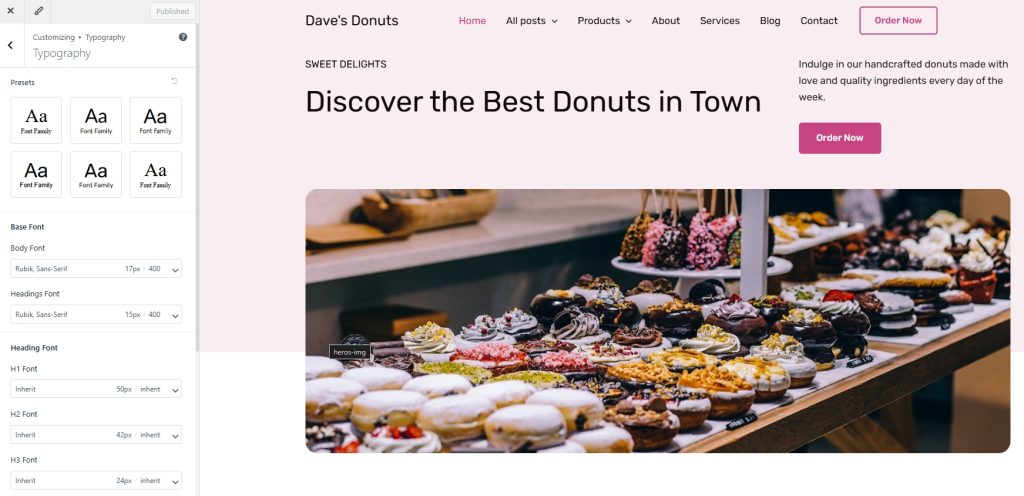
- Increase base font size slightly for body text, especially for mobile
- Adjust line height so text can breathe
- Set larger sizes for H1 and H2 headings to clearly separate ideas
Can you tell what’s most important on the page without reading every word? If not, increase contrast between headings and body text.
Add forms with the same flexibility as the Astra theme using SureForms.
4. Responsive and Mobile-First Experiences
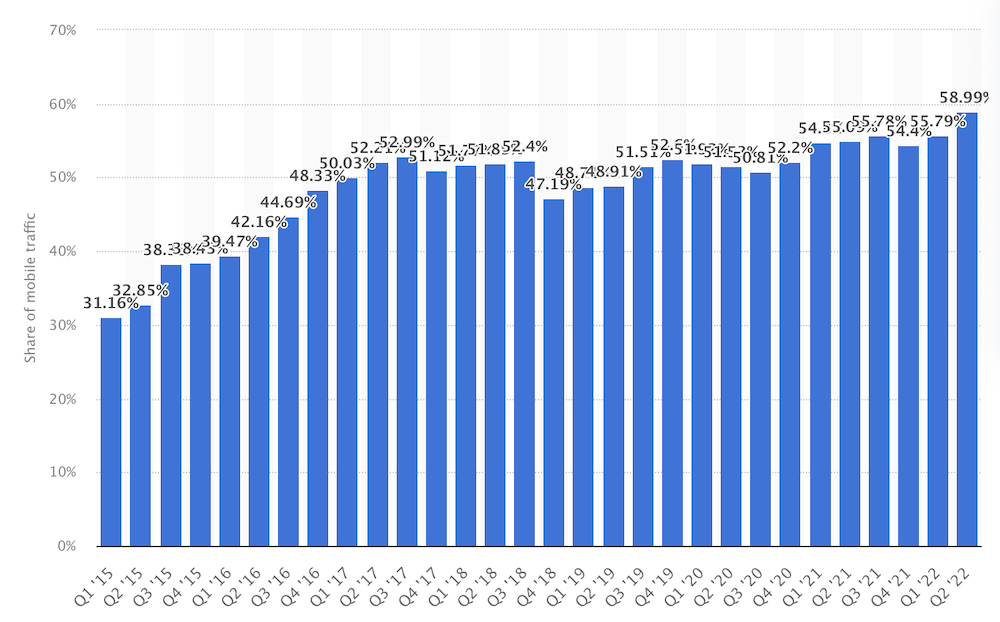
Most users start their journey on phones or tablets so your site needs to work for small screens as well as large ones.
Responsive design means layouts adapt fluidly to any screen size, orientation, or device type.
For example, a service site where horizontal menus on desktop become a prominent icon on mobile, but the core options don’t disappear or require extra taps.
But responsiveness goes deeper than just navigation.
It also includes touch-friendly elements like large buttons and predictable swipes or scroll behaviors.
How To Optimize Mobile Layouts in Astra
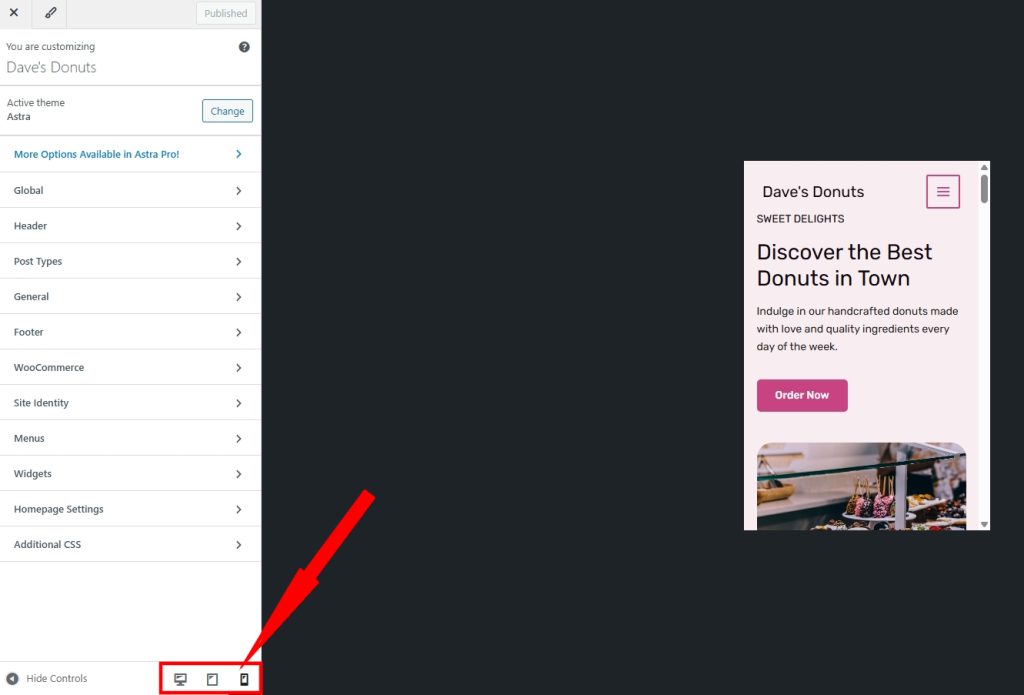
Astra lets you control how designs adapt across devices.
Inside the Customizer:
- Use the device icons to switch between desktop, tablet and mobile views
- Adjust padding and margins specifically for mobile
- Increase button sizes for touch interaction
- Hide non-essential sections on smaller screens
5. Speed Is a Competitive Advantage
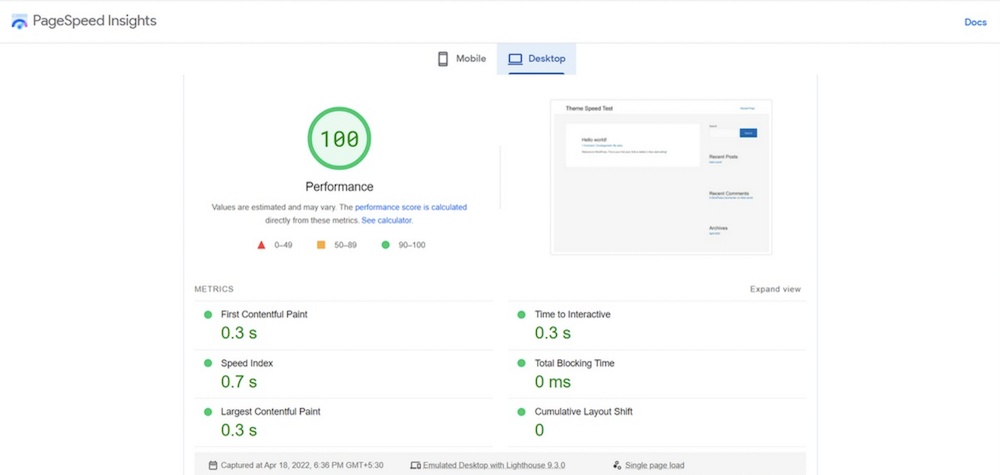
Website performance ties directly into search visibility and user perception.
If your homepage or landing pages lag even slightly, bounce rates spike.
Fast sites feel respectful of the visitor’s time and keep users engaged rather than motivating them to go elsewhere.
Plus, attention spans are shorter than ever and visitors don’t appreciate being kept waiting for anything!
How To Keep Astra Sites Lightweight and Fast
Speed is one of Astra’s strongest advantages, but only if you keep things lean.
To maintain performance:
- Avoid adding unnecessary plugins for layout features Astra already includes
- Use built-in layout controls instead of heavy page elements
- Enable only the modules you actually use
- Pair Astra with optimized images and a caching solution
If you add a feature, ask what it replaces. Don’t let features stack endlessly.
6. Navigation Should Feel Like a Conversation
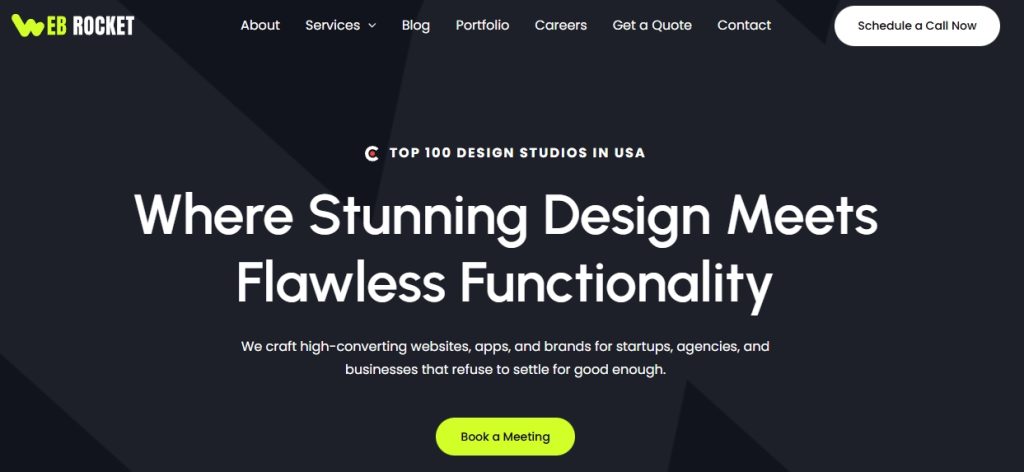
Good navigation helps visitors go where they want without guessing.
Clear labels like “Our Services,” “How It Works,” or “Book A Demo” help users orient themselves faster than ambiguous words like “Solutions” or “Discover.”
Consistent menus reduce friction when users jump between sections.
Smart navigation sometimes adapts based on context or scroll behavior so important options are always visible without cluttering the screen.
How To Create Clear Menus With Astra
Navigation clarity starts in WordPress menus, but Astra helps refine it.
To improve navigation:
- Go to Appearance → Menus and make sure labels are clear
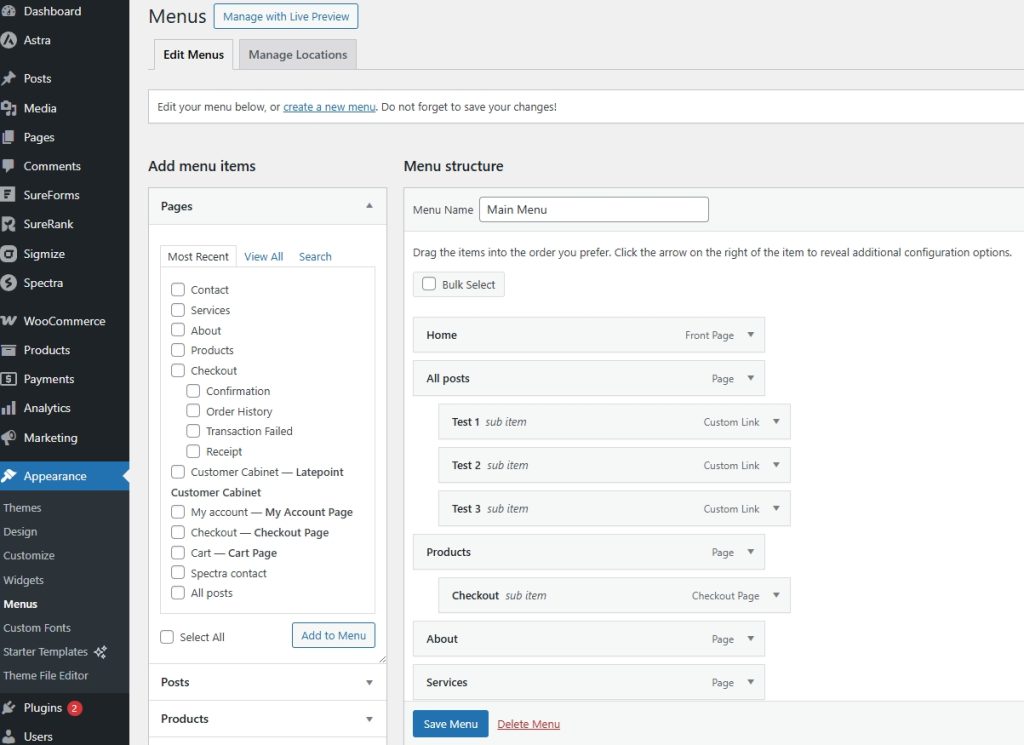
- In Customize → Header Builder, position menus where users expect them
- Use sticky headers sparingly to keep key actions visible
- Avoid dropdown overload. Fewer options perform better
If someone has to open three menus to find a page, the structure needs work.
Navigation should guide, not test memory.
7. Communication Through Design
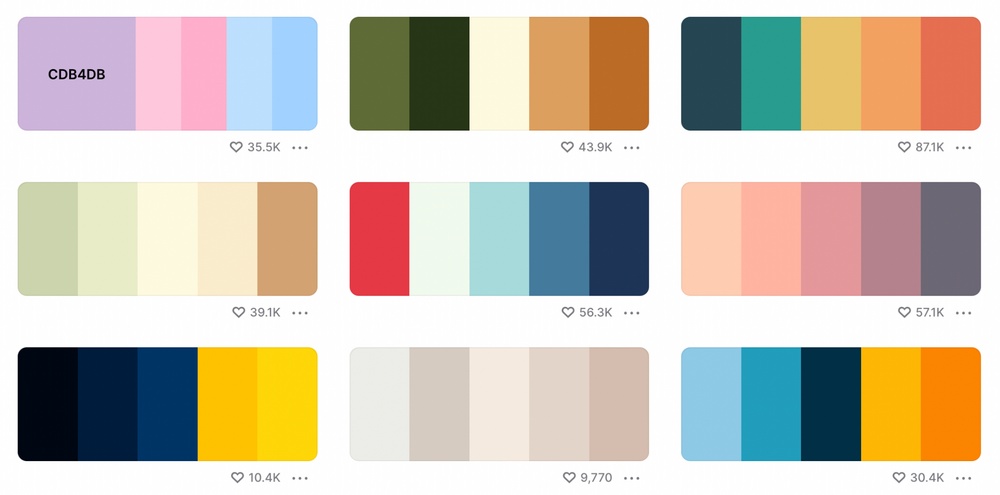
Your site design shouldn’t just look good, it should say something about you or your business.
Use visuals, colors and layout to reinforce meaning, not distract.
Examples:
- Hero sections that briefly explain what you offer before the user scrolls
- Icons beside features that simplify complex ideas
- Inline explanations for buttons like “Start Free Trial” versus just “Go”
Communication isn’t just text. It’s how everything, from imagery to spacing, tells a coherent story.
How To Reinforce Meaning With Astra
Astra’s layout controls help content communicate without extra text.
Ways to do it:
- Use section spacing to separate ideas visually
- Highlight important sections with background colors
- Pair icons with short explanations using lightweight blocks
- Keep call to action buttons visually distinct
For example, a pricing section with extra spacing and contrast signals importance before you even read a single word.
2026 Trends To Watch
We think these 4 web design trends are going to be very popular this year:
- Hyper-personalized dashboards adapt to the individual’s behavior or time of day, offering relevant content first.
- AI-assisted interfaces can tailor layouts and suggestions automatically, removing cognitive work for users.
- Interactive details such as micro-animations or subtle hover effects make experiences feel alive without overwhelming the user.
- Experiences that feel human, conversational, responsive and empathetic, outperform static pages where nothing shifts as the user learns and explores.
How To Experiment Safely With Astra
You don’t need to rebuild your entire site to experiment with what works and what doesn’t.
- Use ZipWP to create new sites to test ideas before going live
- Use consistent global styles so experiments don’t break the brand
- Update one section at a time rather than redesigning everything
- Observe user behavior with Sigmize before rolling out changes
Small iterations beat big redesigns, especially when performance matters.
Where To Find Inspiration and Examples
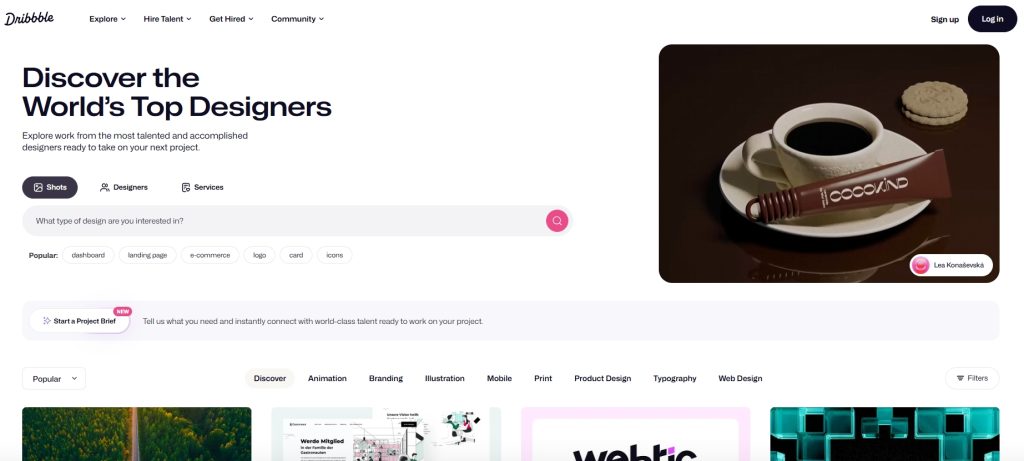
If you want to see what these principles look like in action, check out design communities that curate high-quality work.
Platforms like Dribbble and Behance are full of professional examples you can study and adapt from.
Our own Starter Templates showcase has over 300 great designs you could use or take as inspiration.
Alternatively, inspect sites that solve problems similar to yours. Reverse engineering how they structure content and guide user flows gives you a practical template to follow.
When you’re ready to make changes, SureFeedback helps gather feedback from clients or your team without slowing you down.
Conclusion
Great website design is less about flashy trends and more about clarity, ease, connection and purpose.
Good design feels effortless because it’s built on understanding user needs and designing experiences that feel comfortable.
It’s not about what’s new or flashy, it’s about what works.
Your next steps are simple.
Install the Astra theme and pick a design principle from this post. Apply it to a key page and observe how user behaviour improves.
If it works, keep it and choose another principle. If it doesn’t try something else.
That’s how good design becomes great design!
Which of these principles will you try first? Tell us about it in the comments below!


Abhijeet Kaldate is the co-founder and CRO of Brainstorm Force. With a keen eye for detail and a knack for getting things done, Abhijeet oversees the company's operations, managing key areas such as HR, marketing, design and finance.
Disclosure: This blog may contain affiliate links. If you make a purchase through one of these links, we may receive a small commission. Read disclosure. Rest assured that we only recommend products that we have personally used and believe will add value to our readers. Thanks for your support!



Nice article. Was difficult to acces to it by Google. Just browsing in 5th Google page and find it hehe.
This actions should be done step by step, taking at least between one-three months for each, to ensure the success of the entire project.
Thanks
For me it was the first
Good article!! I think that one of the most important thing for a good SEO job is the design of the pages, seo it’s not only technical or content issues.
I think numbers seven and eight can be condensed into one point.
Well! Maybe…
But as you can see that number 7 speaks about website navigation and page hierarchy that takes the user through the entire website. The 8th page is more about content on a single page and the way you can manage it. 🙂
Hey nice article, I really like that you give emphasis to simple design because simple designs are easy to load and hava a huge impact on the site ranking.
Wow! I really enjoyed reading this. All know that business website is the internet face of your company, so it’s of the utmost importance to create a great website design that will appeal to website visitors.
Those illustrations are something I am looking to boost my website with. I am trying to find ways to enhance my website/browsing experience for my clients. Great article thank you!
You’re welcome Adrian! 🙂
Thanks for the tips
I can relate to point 8, from my own attempts. It’s easy to insert to much text content that tries to impress the visitor about the history of your company and your achievements. When all that is needed is required is the information they seek, bulleted or listed. The finer details can be linked from the bullet points, should the visitor wish to learn more.
Good article!! I think that it is one of the most important things for a web development agency.
Thank you for this content. These tips will be very helpful.
I really love this Sujay! Totally agree with what you said, “Study shows that visitors stay more time on the websites having easy navigation.” That is soo true! I hate taking so long on a website to find what I need! Keep it up!
The facts have been discussed are really important, keep up the good work
thank u
You’re welcome! 🙂
Good article and excellent way to articulate, keep it up
Great article! Designing a website is an important part of any company’s online marketing campaign;
Good read, I like the info you supply for your articles, Thanks for sharing smart thoughts.
Thank you so much for sharing a great article. Keep up the great work!
We specialize in amazing luxury web design and luxurious graphic design. Well, this is a great post and thanks for sharing.
This is actually a really nice article. I’ve been wanting to start designing my website but I have no clue how. This is really helpful. Good job!
Very nice article! Although, number 6, doesn’t seem much related to web design as it is to user experience in general.
But overall nice article, this is extremely helpful!
Yes, that’s true!
But, this is an attempt to focus on things related to website design. Number 6 can be an extension to the CSS mentioned in number 2. Things like CSS code, etc. should be compressed.
And, we are glad you liked our article. 🙂
Very nice article! Although, number 6, doesn’t seem much related to web design as it is to user experience in general.
But overall nice article, this is extremely helpful!
Very nice article! Although, number 6, doesn’t seem much related to web design as it is to user experience in general.
But overall nice article, this is extremely helpful!
#5 Speaks to me so damn much! ?
I’ve never been able to pick the best color palette. And when I do my website looks like a splat of paint. But overall excellent points.
Would help if you can add tools for us to use.
Nice list! It’s concise and comprehensive at the same time.
Good job on this.
I agree so much with #1. Simple is key.
Very well thought out article. Kudos!
I thought I was getting old with the “three-click-rule”. Turns out it’s still the same.
Been wanting to update my site design for some time now. This is really helpful. Thanks!
Nice article! Albeit, number 6, doesn’t appear to be abundantly identified with website architecture all things considered to client involvement with general.
In any case, in general pleasant article, this is very useful!
Awesome article!
It would be helpful to add some tools in there too to complete the bunch.
But overall nice job!
That’s really informative post. I appreciate your skills. Thanks for sharing.
A good page layout and design are not only good for aesthetic purposes, but also for SEO. Thank you for your contribution with this post
#5 Speaks to me so damn much! ?
I’ve never been able to pick the best color palletes. And when I do my website looks like a splat of paint. But overall excellent points.
Would help if you can add tools for us to use.
This is actually a really nice article. I’ve been wanting to start designing my website but I have no clue how. This is really helpful. Good job!
Very nice article! Although, number 6, doesn’t seem much related to web design as it is to user experience in general.
But overall nice article, this is extremely helpful!
I agree so much with #1. Simple is key.
Very well thought out article. Kudos!
I thought I was getting old with the “three-click-rule”. Turns out it’s still the same.
Been wanting to update my site design for some time now. This is really helpful. Thanks!
Literally blank on how I can redesign my website.
I have no clue where to start. Thanks to this article for pointing them out.
#1 is a great point to emphasize too! Good job!
Consistency is the key! Excellent point to send across.
I see a lot of websites out there that are just all over the place! Yikes! Great job with the article.
And great job with Astra too! Love it!
This is actually a really nice article. I’ve been wanting to start designing my website but I have no clue how. This is really helpful. Good job!
Hello Nathaly,
Glad you found the article useful! 🙂
Love the article!
all aspects of this content, is brilliantly accommodating. A website after reading this informative piece, will surely exceed ones website.
Xie xie, Relishia
Really enjoyed your article as its highly informative
Thank you very much for presenting this data about good website design, it’s known how to get approved but what are the next steps after getting the approval… Wonderful information, thanks a lot for sharing kind of content with us… great post! One must check this flightdigital.co.nz it gives us more info on this topic.
the information presented is accurate and detailed, very interesting.
Hello there,
So glad to hear that you found the article useful! 🙂
hey there,
thank you for sharing the article. this article is so informative This is really a truly pleasant article. I’ve been needing to begin planning my site yet I do not understand how. This is truly useful. Great job!
Hello there,
Glad that you found this useful and thank you for leaving a comment. 🙂
Thanks for sharing nice blog post. Its blog information is very helpful and valuable.
Hello there,
Glad you found this article helpful. 🙂
Nice article keep sharing with us.
Glad that you liked it! 🙂
Very well !
I read this and really like because i’m looking website design agency services in Florida too. Thats really beneficial info for those who are interested for that.
Carry one author for share this kind of technical info.
Hello Henry, glad that it helped. 🙂
Nice article.
Best information! Thank you for sharing with us
This was a very meaningful post, so informative and encouraging information, Thank you for this post.
home services app development
Great article. Really useful information. Best I’ve read in a while on this subject. Thanks so much for all your efforts.
Everything is clear. Thank you!
This article explains some really good practices. Excellent insights. Well written!
Glad to hear that you liked the insights, David! 🙂
Excellent article! I’ve been wanting to start developing my website, but I have no idea how to do it. But you solved my all problems. This is very beneficial. Thank you.
Really enjoyed your article as its highly informative
Glad you liked it, Andy! 🙂
This really helpful. Really appreciate it. Thank you guys for the excellent work
Glad you liked it, Abraham! 🙂
Thank you for sharing the information. I appreciate reading it because it was both informational and beneficial.
Nice Blog
At Ideal designs, we believe that design should not just look good. It should also work well; it should be memorable and it should connect with the end-user. The success of many businesses today depends on how vital a role ‘good’ design plays in their business strategy. Design is often the first thing that the consumer comes in contact with, before you can meet the company representative, you see the logo… and ‘good’ or ‘effective’ design has already started playing a vital role.
This article contains some of the best information on this subject. I learned some principles of good website design after reading this article.
Excellent article! I’ve been wanting to start developing my website, but I have no idea how to do it. But you solved my all problems. This is very beneficial. Thank you
Great deals of important information and the articles are great.
I am bookmarking it for future reference and consultation. Many thanks for sharing! 🙂
Thanks for this informative and helpful blog! I look into the website’s speed and if it’s easy to navigate because it annoys me if both website characteristics are in a bad state.
I learned from one digital marketing course that website frameworks must work well to land on the correct link, and it also has to do with the psychological aspect of a website visitor. What are your tips on applying website wireframes to a website?
Great article to have good!
Very interesting and thanks for sharing such a good blog. Your article is so convincing that I never stop myself from saying something about it. You’re doing a great job. Keep it up.
Really very helpful and informative article!! Thanks for sharing your intelligent thoughts.
Hey that’s one helpful and interesting article you have shared here.
An extremely useful and educational article! I appreciate you giving your wise ideas. Your post convinces me so much that I simply can not help but comment on it. You’re performing excellently. Keep going.
Article is great, thanks for sharing
Thank you for sharing such kind information with us i am looking to develop a custom web development and your blog really helped me that what i need in my website.
keep sharing blogs like this.
Great post. Thank you for sharing.
New Product Design & Development Services
Thanks for sharing these ideas with us. Social media is one of the greatest ways to generate traffic & improve web design. The Marketing Muslimah is an online web design and development service, provider. If you need any help, please feel free to knock us.
Thanks for such an insightful article!!
A well-designed website should be easy to navigate, with a clean and professional layout. The website should be designed with the user in mind, and all content should be easy to find and read. The website should also be responsive so that it can be viewed on all devices.
Nextwebi, a leading web designing company, enhances your business growth with fast-loading, visually pleasing, user-friendly websites.
Thank you for sharing the information. I appreciate reading it because it was both informational and beneficial.
Thanks for sharing the article. I had a great time reading this, the article was informative and useful.
Great, Keep it up and Thanks for sharing such a good information.
Must-read content
Thank you so much for sharing this beautiful blog related to website development and digital marketing services it is very useful for all type of people to promote their business and increase their profitable level.
Hi there, that’s another amazing post on the subject. Thanks for the tips which you mentioned are very helpful while reading. We must follow all of them while reading and studying about them.
Hi,
Great Blog! Very Informative.
Very useful & helpful information about blog commenting. Thank you so much for sharing.
Very Nice Article.
Very informative post. Thanks for sharing.
Thank you for sharing your expertise in such a comprehensive manner!
Thanks For the best post very useful information .Thank you for sharing this post and help full content.
“Excellent article! The 8 principles of good website design you’ve outlined are spot on. The examples help illustrate each principle and how they can be applied in real-life situations. Thank you for sharing this valuable information.”
I agree. A website’s design is crucial to its success. It can make or break a user’s experience, so it is important to get it right. From understanding the importance of white space to making sure content is easily accessible, these principles will ensure that your website looks professional and functions well. By following these guidelines, you can create good website design that users will find enjoyable and easy to use. If you have some time you may visit artstream-media.com I highly recommend this team for anyone looking for quality web design services!
Great Work
Great post!